Getting Started with Bastille
It’s dangerous to go alone! This guide takes you from a fresh FreeBSD install to running containers in under twenty minutes.

Bastille on FreeBSD
This document is designed to help you be successful in your use and adoption of Bastille and FreeBSD. This document begins with a brand-new FreeBSD 15.1 system deployed locally or in the cloud. Manual installation is not covered in this document.
Firstboot
Upon logging into a system for the first time it is recommended to apply any security patches available:
freebsd-update fetch install
reboot
After the reboot is complete, run freebsd-update install once again.
freebsd-update install
Verify your version and patch level with freebsd-version.
freebsd-version
Tip: subscribe to this mailing list for FreeBSD security notifications (low volume). Anytime you receive an email from this list, re-run
freebsd-update fetch install.
Packaging
FreeBSD provides binary packages, available in quarterly (default) and latest
branches. These binary packages are built from the FreeBSD ports tree, which
follows a rolling-release model. This means up-to-date packages are often
available. To use the binary package manager, bootstrap it by running pkg for
the first time:
root@freebsd:~ # pkg bootstrap
The package management tool is not yet installed on your system.
Do you want to fetch and install it now? [y/N]: y
Bootstrapping pkg from pkg+http://pkg.FreeBSD.org/FreeBSD:15:amd64/quarterly, please wait...
Verifying signature with trusted certificate pkg.freebsd.org.2013102301... done
[freebsd] Installing pkg-2.2.1...
[freebsd] Extracting pkg-2.2.1: 100%
root@freebsd:~ #
Tip: this bootstrapping step can be automated using the following command:
env ASSUME_ALWAYS_YES=YES pkg bootstrap
Quarterly
If you take a closer look at the line of output after the bootstrap
confirmation you’ll notice that the last part of the URL says quarterly:
Bootstrapping pkg … pkg.FreeBSD.org/FreeBSD:15:amd64/
quarterly, please wait…
This subscribes the host to a quarterly release cycle for binary packages. For most systems this is adequate. No changes are needed to subscribe to the quarterly repository.
Latest
To use the latest binary packages, update the pkg URL to use the latest suffix
instead. A simple way to override the default settings is to create a new
repository config with the updated path of latest.
Migrate to latest:
mkdir -p /usr/local/etc/pkg/repos
echo 'FreeBSD: { url: 'pkg+http://pkg.FreeBSD.org/\$\{ABI\}/latest', enabled: yes }' > /usr/local/etc/pkg/repos/FreeBSD.conf
Package Basics
In this section you’ll learn the basics of using the package manager, and install a few creature comforts. FreeBSD’s binary package manager works much like others you may have used.
Example
pkg install vim git-lite bash ca_root_nss
The above pkg install command will add the vim, git-lite, bash and
ca_root_nss (CA certificates) from the quarterly/latest repositories.
Naturally you can replace bash with zsh (or another shell of your choice).
You may also search the pkg repository for named packages. pkg search foo
will match packages including foo.
Tip: Check out FreshPorts.
pkg help
You can always find help and a list of other options using pkg help.
Install Bastille
Now that you’ve had a crash course in package basics, let’s install bastille
and start working with containers. Use one of the three options below. These
are listed in order of preference / support.
PKG
pkg install bastille
Note: as outlined above, the version of Bastille installed may differ depending on whether you’re using
quarterlyorlatest.
PORTS
portsnap fetch auto
make -C /usr/ports/sysutils/bastille install clean
GIT(bleeding edge/unstable)
git clone https://github.com/BastilleBSD/bastille.git
cd bastille
make install
Service Management
Services in FreeBSD are managed centrally in the /etc/rc.conf and use a
syntax of name_enable=(YES|NO). For example, to start containers
automatically at boot you can set bastille_enable=YES using:
sysrc bastille_enable=YES
By default, Bastille will start all created containers at boot when enabled.
Once services have been enabled in the /etc/rc.conf, they can be managed
using the service command.
service foo [start|stop|restart]
Bastille does not run as a service and does not need to be started as such. Enabling Bastille primarily manages containers at startup and shutdown.
Host Setup
Before you can create containers, the host needs three things configured: a network interface for containers to attach to, firewall rules, and storage.
Historically this meant manually cloning a loopback interface, hand-writing an
/etc/pf.conf, and editing bastille.conf for ZFS. Bastille now does all of it
for you with a single command:
bastille setup
Run with no options, bastille setup auto-configures:
- Loopback networking — a
bastille0interface that containers attach to by default. It isn’t tied to any physical interface, which makes it equally at home in the cloud or on a local network. This is the simplest, most portable option, and it’s the one this guide uses. - Firewall — enables
pfand writes a sane default/etc/pf.conf: outbound traffic is allowed, inbound is blocked (except SSH), and a NAT rule gives your containers external network access. This is also what makes thebastille rdrcommand work for forwarding host ports into a jail. - Storage — configures a ZFS pool and dataset for Bastille if ZFS is available on the host; otherwise it falls back to UFS.
That’s the entire host preparation — no manual pf.conf, no cloned_interfaces
juggling, no ZFS boilerplate.
Tip:
bastille setupenables and startspf. If you’re connected over SSH, the default ruleset allows SSH back in — if your session drops, simply reconnect.
Need a different networking mode? bastille setup takes an option for each of
the other host configurations, for example:
bastille setup bridge      # bridged VNET (-B) jails
bastille setup vnet        # virtual network (-V) jails
bastille setup linux       # run Linux jails
bastille setup firewall    # (re)configure pf only
bastille setup storage     # configure ZFS/UFS storage only
See the setup documentation and networking documentation for the full list of modes and options.
Configuration
Bastille’s configuration lives in /usr/local/etc/bastille/bastille.conf.
bastille setup populates the essentials, but one option is worth knowing about:
Timezone — containers use the host’s timezone by default. To pin a specific
zone instead, set bastille_tzdata (format "America/Denver" or
"Europe/Paris"; see /usr/share/zoneinfo):
bastille_tzdata="America/Denver" ## default: empty = use host's time zone
With the host configured, you’re ready to bootstrap a release and begin creating containers!
bootstrap
To bootstrap a release for use with your container use the bootstrap
sub-command.
You can optionally append the keyword
updateto automagically applyfreebsd-updateto the downloaded release.
bastille bootstrap 15.1-RELEASE update
You can now create a container using the newly bootstrapped release.
create
In order to create a container you will need to provide a unique container name, a bootstrapped release name and static IP address.
You can use any (rfc1918) private IP range for your containers. For example, unless your host IP also has a 10.x.x.x IP, it’s safe to use any address within that range.
IP options include: 10.0.0.0/8, 172.16.0.0/12 and 192.168.0.0/16.
Tip: container names cannot include the dot (".") character.
Container creation should be very quick.
bastille create alcatraz 15.1-RELEASE 10.17.89.50/24
list
You can list running containers.
bastille list
pkg
Install packages inside the container.
bastille pkg alcatraz install -y htop
htop
htop is an interactive process viewer. When you view processes inside a container you only see that container’s processes.
bastille htop alcatraz
Notice that syslogd and cron are the only default processes.
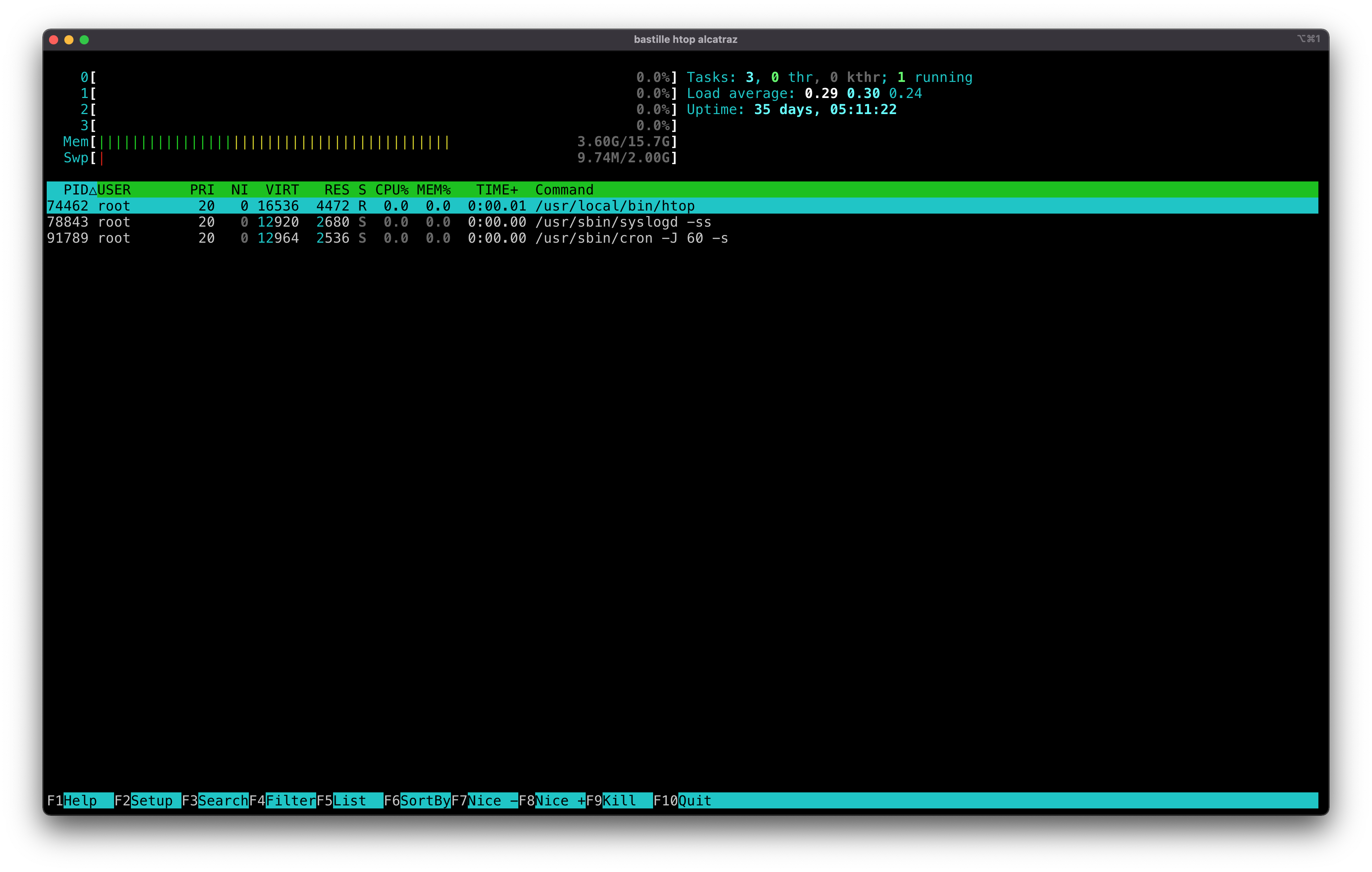
Tip: Press “q” to quit.
sysrc
Let’s toggle a setting inside the container and enable the sshd service.
bastille sysrc alcatraz sshd_enable=YES
[alcatraz]:
sshd_enable: NO -> YES
service
Start up the newly enabled service.
bastille service alcatraz sshd start
[alcatraz]:
Generating RSA host key.
2048 SHA256:PsH1pAJbRC4hup+jyDxhFxhMHcGrYBWr5aL84y3Bjc0 root@alcatraz (RSA)
Generating ECDSA host key.
256 SHA256:eqCAkH/tW2OnrV4B3BflK76ZV08jWGfoHF7AX/iPvM8 root@alcatraz (ECDSA)
Generating ED25519 host key.
256 SHA256:1GFg1+agxbEZpernrtrcKEfLzWcih+2xRaOe97fmMcU root@alcatraz (ED25519)
Performing sanity check on sshd configuration.
Starting sshd.
cmd
Execute arbitrary commands inside the container. In this case check to see that
sshd is listening on port :22 using the sockstat -4 command.
bastille cmd alcatraz sockstat -4
[alcatraz]:
USER     COMMAND    PID   FD PROTO  LOCAL ADDRESS         FOREIGN ADDRESS
root     sshd       34994 4  tcp4   10.17.89.50:22        *:*
[alcatraz]: 0
console
Finally, use console for a password-less root login to the container and have
a look around. You’ll find yourself in a wholly contained FreeBSD system with
the ability to build whatever you need to build.
bastille console alcatraz
The root user is still (mostly) all powerful, but only within the confines of
that container.
When you’re finished, log out of the container as normal with exit or
ctrl-d.
stop
When you’re done testing your container you can shut it off.
bastille stop alcatraz
destroy
Lastly, destroy your lightweight container.
bastille destroy alcatraz
usage
Bastille is an open-source system for automating deployment and management of
containerized applications on FreeBSD.

Usage:
  bastille command [option(s)] TARGET [option(s)] ARGS

Available Commands:
  bootstrap   Bootstrap a FreeBSD release for container base.
  clone       Clone an existing container.
  cmd         Execute arbitrary command on targeted container(s).
  config      Get or set a config value for the targeted container(s).
  console     Console into a running container.
  convert     Convert a Thin container into a Thick container.
  cp          cp(1) files from host to jail(s).
  create      Create a new thin container or a thick container if -T|--thick option specified.
  destroy     Destroy a stopped container or a FreeBSD release.
  edit        Edit container configuration files (advanced).
  etcupdate   Update /etc directory to specified release.
  export      Exports a specified container.
  help        Help about any command.
  htop        Interactive process viewer (requires htop).
  import      Import a specified container.
  jcp         cp(1) files from a jail to jail(s).
  limits      Apply resources limits to targeted container(s). See rctl(8).
  list        List containers (running).
  migrate     Migrate targetted jail(s) to a remote system.
  mount       Mount a volume inside the targeted container(s).
  network     Add/remove network interfaces from targeted container.
  pkg         Manipulate binary packages within targeted container(s). See pkg(8).
  rcp         cp(1) files from a jail to host.
  rdr         Redirect host port to container port.
  rename      Rename a container.
  restart     Restart a running container.
  service     Manage services within targeted container(s).
  setup       Attempt to auto-configure network, firewall and storage on new installs.
  start       Start a stopped container.
  stop        Stop a running container.
  sysrc       Safely edit rc files within targeted container(s).
  tags        Add or remove tags to targeted container(s).
  template    Apply file templates to targeted container(s).
  top         Display and update information about the top(1) cpu processes.
  umount      Unmount a volume from within the targeted container(s).
  update      Update container base -pX release.
  upgrade     Upgrade container release to X.Y-RELEASE.
  verify      Compare release against a "known good" index.
  zfs         Manage (get|set) ZFS attributes on targeted container(s).

Use "bastille -v|--version" for version information.
Use "bastille command -h|--help" for more information about a command.
Use "bastille -c|--config FILE command" to specify a non-default config file.
Use "bastille -p|--parallel VALUE command" to run bastille in parallel mode.
To learn more about automating containerized applications, see the Bastille Documentation.

Christer Edwards
Creator of BastilleBSD. FreeBSD systems engineer, software developer, author, and educator with 15+ years hardening and automating production FreeBSD infrastructure.